Private Client Onboarding Resources

What to Expect as a Mowery & Schoenfeld Private Client

Welcome! We’re excited to work with you.

As we begin our new relationship, you might have some questions: What happens next? What information do you need from me? Why haven’t I heard anything yet?

Our goal is to let you know what to expect and the steps you can take to help keep everything running smoothly.

Jump to section:

Your Onboarding Checklist

First things first: Be sure to complete the following to-dos.

1. Provide the requested information via TaxCaddy

A link to securely provide this information is included in your welcome email. Documents/information needed by tax return type:

1040

1041

  • Date of birth
  • Phone number
  • Email address
  • Prior year’s filed tax return
  • Trustee contact information (email address and phone number)
  • Trust agreement
  • Prior year’s filed tax return

2. Fill out your questionnaire

You will receive a questionnaire via your TaxCaddy account. Answer the questionnaire as completely and as soon as possible. 

3. Save important Mowery & Schoenfeld contacts

Add your Mowery & Schoenfeld engagement team, SafeSend (noreply@safesendreturns.com), and TaxCaddy (noreply@taxcaddy.com) email addresses to your approved contacts list so you don’t miss any important emails.

What Happens After Onboarding?

During the initial phase, your team will:

  • Review your prior tax filings

  • Set up your account within our systems

  • Assess any upcoming filing requirements

  • Identify potential planning opportunities

Throughout the year, depending on your services, we may help with:

  • Estimated tax payments
  • Tax planning discussions
  • IRS or state notices

Tax season is when most activity will happen. We will request the information needed to prepare your return and communicate any questions or planning opportunities that come up.

If you have a significant change before tax season, don’t wait to contact us. Major life changes like marriage, sale/purchase of a home, or a new job can have important tax implications. 

Timeline

Action Item / Deliverable 

Calendar Year Due Date / Expected Receipt 

Statement of Engagement (SOE)/Engagement Letter from Mowery & Schoenfeld 

Jan. 15 

Questionnaire 

Jan. 31 

Document Request List (DRL) 

Jan. 31 

Tax Filing Due Date (Individual and Fiduciary) 

April 15 

Q1 Estimate/Extension Payment, if necessary 

April 15 

Q2 Estimate  

June 15 

Q3 Estimate 

Sept. 15 

Extended Tax Filing Due Date (Fiduciary) 

Sept. 30 

Extended Tax Filing Due Date (Individual) 

Oct. 15 

Q4 Estimate  

Jan. 15 


Dates are based on a calendar year ending Dec. 31 and will vary for fiscal year-end filings. 

What is SafeSend?

SafeSend Returns is our secure tax return delivery and electronic signature platform. It allows you to receive completed tax returns, review documents, electronically sign required forms, and receive payment instructions without printing or mailing paperwork.

When your return is ready, you’ll receive an email from Mowery & Schoenfeld through SafeSend Returns.

How SafeSend works

  • You receive an email notification when your return is ready.
  • Access your return through a secure link.
  • Verify your identity using a one-time access code.
  • Review and electronically sign required authorization forms.
  • Once signed, M&S is notified and completes the filing process.

Other questions about SafeSend? Contact your Mowery & Schoenfeld tax administrator, LaHetta Eyrich, at 224-278-1503 or leyrich@msllc.com.

What is TaxCaddy?

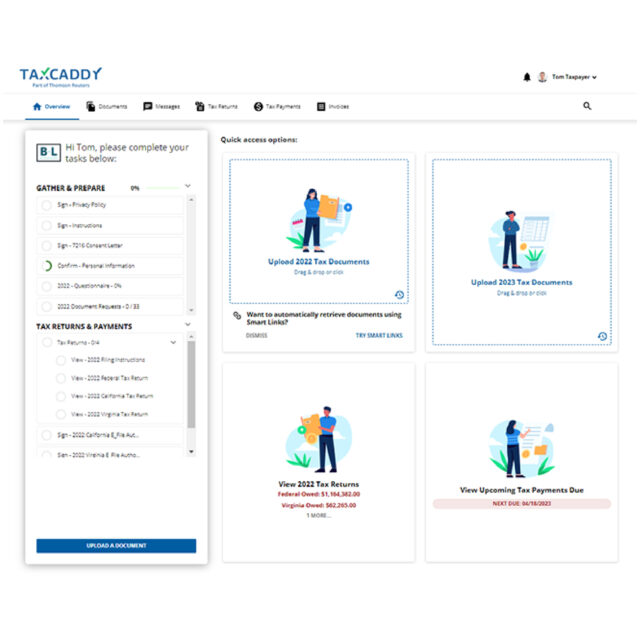
TaxCaddy is our secure document gathering and communication platform. It allows you and your tax team to access the same information in one place and helps keep important documents organized throughout the year. 

Through TaxCaddy, you can: 

  • Upload tax documents securely 
  • Complete questionnaires and information requests 
  • Track outstanding items 
  • Communicate with your tax team 
  • Access information from your computer, tablet, or mobile device 
  • Sign and manage certain tax-related documents electronically 

 Getting started with TaxCaddy 

  1. Mowery & Schoenfeld will send you a TaxCaddy invitation email. In the email, click “Get Started.” 
  2. Enter your mobile number to receive your 6-digit verification code or authenticate your account using the last four digits of your SSN if applicable. 
  3. After verifying your account and accepting the Terms of Use, you will be logged in to the system. 
  4. Click “Set up account password” in the upper right-hand corner of the Overview screen and follow the prompts to create your account. 
  5. Grant access to your spouse, financial advisors, or other users, as needed. 

How to upload your documents

  • On your TaxCaddy overview page, select the current tax year Document Requests task 
  • On the Document Requests screen, you’ll see a customized list of requested documents based on your prior tax return.  
  • Click an item from the list to upload the document from your computer. Accepted file formats are: .pdf, .docx, .xls and .xlsx. You can upload multiple files to the same category at one time. 
  • If you have additional documents that aren’t on the request list, open the Documents tab and click “Upload a Tax Document Not Listed Here.” 
  • For added convenience, you can use the TaxCaddy app to submit photos of paper documents from your phone. 

Need help with TaxCaddy? Contact your Mowery & Schoenfeld tax administrator, Stephanie Jackson, at 847-281-3588 or sjackson@msllc.com.

Frequently Asked Questions (FAQs)

Why haven’t I received a document request yet?

Tax return preparation usually follows filing deadlines and the timing of your organization’s year-end. In many cases, we’ll send information requests closer to when we begin preparing your return.

Should I send documents as soon as I receive them?

Yes. Sending information as you receive it can make tax season much easier.

What if my personal, family, or fiduciary situation changes during the year?

Please contact your Mowery & Schoenfeld advisor if you experience:

  • A major life event, such as marriage, divorce, birth, adoption, or death in the family 
  • A change in income, employment, retirement status, or residency 
  • The sale or purchase of a home, investment property, or other significant asset
  • A large gift, inheritance, trust distribution, or charitable contribution
  • A change in trust terms, trustee responsibilities, beneficiary information, or fiduciary activity
  • Any IRS or state tax notice, unexpected tax payment, or other issue that could affect your return

Early planning often creates additional opportunities and helps prevent surprises later.

How do I know my onboarding is complete?

Once all requested onboarding information and engagement documents have been received, your M&S team will handle the setup and review process. If additional information is needed, we will reach out to you directly.

Does SafeSend file my tax return with the IRS?

No. SafeSend allows you to review your return and electronically sign your authorization forms. Once those forms are signed, we are notified and complete the filing process.

What documents or information should I upload to TaxCaddy? 

You should upload any tax documents you receive throughout the year, including W-2s, 1099s, K-1s, mortgage interest statements, charitable contribution records, investment statements, trust or estate documents, and any IRS or state tax notices. If you’re unsure whether something is relevant, it’s best to upload it or ask your Mowery & Schoenfeld team.